
Project Overview

My Golf Scoreboard is a simple full-stack web application designed for tracking and displaying golf tournament scores in real-time. Built for an outing I took with my friends, the application provided an intuitive interface for scorekeeping and a live leaderboard that updates automatically as teams submit their scores. The system was designed for teams of two, and is configured to be course-aware, meaning it understands the par for each hole and displays scores relative to par (e.g., E, +2, -1), making it easy to see who’s leading at a glance.

I deployed the scoreboard on a Digitial Ocean droplet, which was facilitated by the docker development pipeline. The system had to function seamlessly on mobile browsers for both the score entry interface and to navigate across the leaderboard landing page and rulebook - which was a great learning opportunity to debug using browser tools and physical hardware.
Features

Course-Aware Scoring

The scoreboard has the course scorecard configured, so the entries reflect the par for each hole on the course, automatically calculating and displaying scores relative to par. This makes it immediately clear which teams are performing well, whether they’re under par (shown in green) or over par (shown in red).

Real-Time Leaderboard

The leaderboard updates automatically every 30 seconds, ensuring spectators and participants always see the latest tournament standings. Teams are ranked by their total score relative to par, with visual indicators for the top three positions.

Team Authentication

Each team has secure login credentials, ensuring only authorized teams can submit scores. The system uses industry-standard JWT (JSON Web Token) authentication with bcrypt password hashing for security.

Detailed Scorecards

Clicking on any team in the leaderboard reveals a detailed scorecard showing their performance on each hole. This includes the score for each hole, the par for that hole, and how the team performed relative to par.

Mobile-First Design

The entire application is built with mobile devices in mind, making it easy for teams to enter scores directly from their phones while on the course. The responsive design adapts to larger screens for tournament displays.

Score Entry Interface

Teams can easily select any hole and enter their score. The interface shows which holes have already been scored (marked with a green indicator) and automatically advances to the next hole after submission. The system also displays the par for each hole and calculates the relative-to-par score as you type.

Technical Stack

Frontend

  • React 18 with TypeScript for type-safe, component-based UI development
  • TailwindCSS for modern, responsive styling
  • Vite as the build tool for fast development and optimized production builds
  • React Router for client-side navigation
  • Axios for HTTP requests to the backend API
  • Lucide React for consistent iconography

Backend

  • FastAPI (Python) for a high-performance, modern REST API with automatic OpenAPI documentation
  • SQLAlchemy as the ORM (Object-Relational Mapping) for database interactions
  • PostgreSQL as the relational database for persistent data storage
  • Python-JOSE for JWT token generation and validation
  • Passlib with bcrypt for secure password hashing

Infrastructure

  • Docker and Docker Compose for containerized deployment
  • Nginx as a reverse proxy for production deployments
  • PostgreSQL database with initialization scripts for course and team setup

Architecture Highlights

The application follows a clean separation of concerns with a RESTful API architecture. The backend exposes endpoints for authentication, score submission, and leaderboard retrieval. The frontend consumes these APIs and manages state using React Context, providing a reactive user experience. Real-time updates are achieved through polling, with the leaderboard automatically refreshing every 30 seconds.

Use Cases

Golf Tournaments

Perfect for organized tournaments where multiple teams compete simultaneously. Tournament organizers can configure the course and teams, then let the system handle score tracking and display.

Casual Rounds with Friends

The application works equally well for friendly competitions, making it easy to track scores and see who’s winning throughout the round.

Live Tournament Displays

The leaderboard interface is designed to be displayed on large screens or projectors, giving spectators a clear view of tournament standings as they evolve.

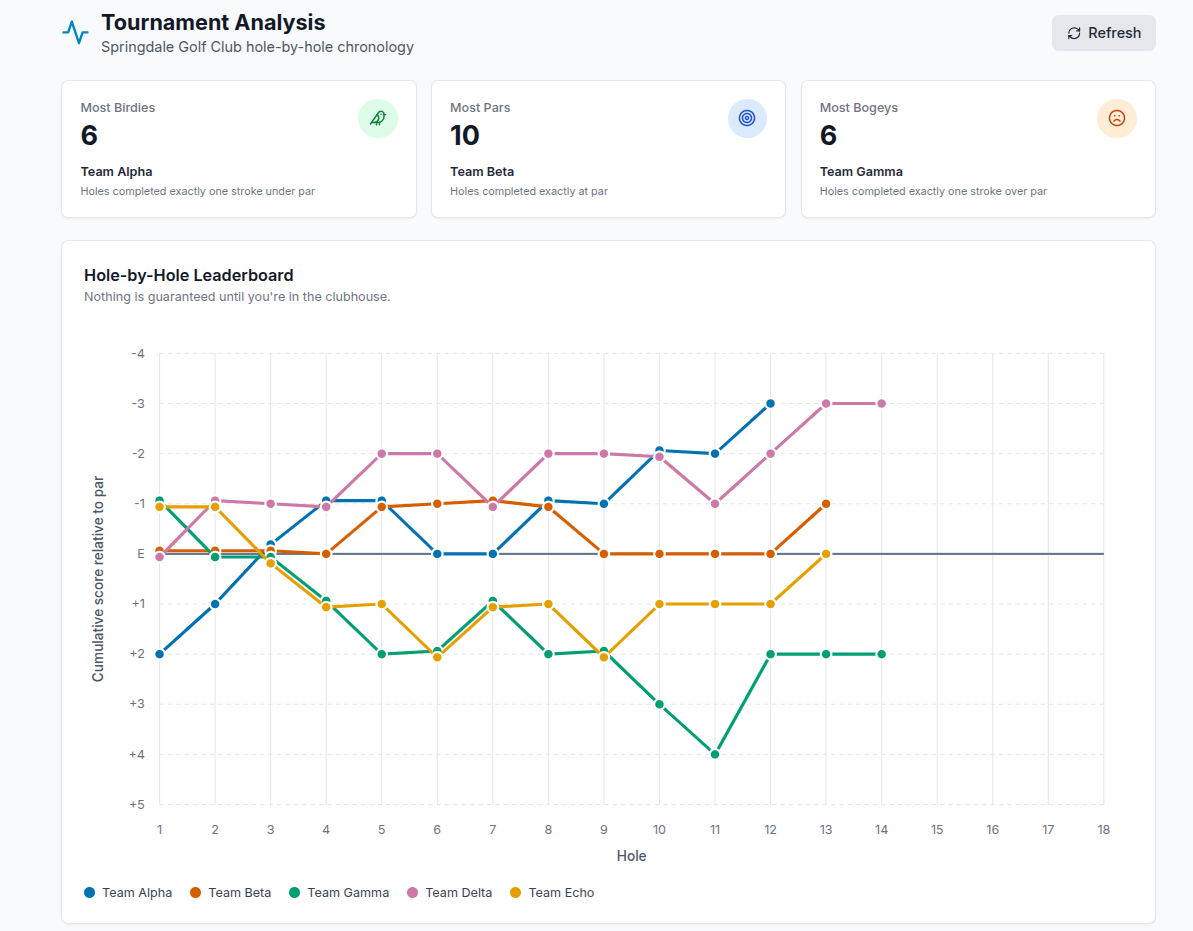
Score Tracking and Analysis

The detailed scorecard feature allows teams to review their performance hole-by-hole, identifying strengths and areas for improvement.

Technical Challenges and Solutions

Course Configuration

The system needed to support different golf courses with varying hole pars. This was solved by storing course information in the database as JSON, allowing flexible configuration while maintaining data integrity.

Real-Time Updates

Achieving real-time updates without WebSocket infrastructure was accomplished through intelligent polling. The frontend automatically refreshes the leaderboard, and the backend efficiently queries the database to calculate relative-to-par scores on demand.

Mobile Usability

Ensuring the score entry interface works well on mobile devices required careful attention to touch interactions and form handling. Custom hooks were developed to handle mobile-specific click events, and the UI was designed with large, touch-friendly buttons.

Security

Team authentication was implemented using industry-standard practices: passwords are hashed with bcrypt, and JWT tokens provide stateless authentication. The API validates tokens on every request, ensuring only authenticated teams can submit scores.

Skill-Building

This was a fun project to have a sandbox for full-stack web development, while creating a useful application for my golf outings with friends. My primary skill takeaways were:

  • API Design: Creating a well-structured REST API with proper authentication and error handling
  • Database Design: Designing a normalized database schema that efficiently supports the application’s requirements
  • User Experience: Building intuitive interfaces that work across devices and use cases
  • DevOps: Containerizing the application for easy deployment and scaling
  • Real-World Deployment: Acquiring domain names, configuring DNS, using production separation for docker workflows
Back to Personal Projects